JetPack 7.2.1 Jetson Orin Nano: Should You Update?
JetPack 7.2.1 changes the installer and defaults Super Mode on Jetson Orin Nano Developer Kits. Decide whether your robotics prototype should update.
Plan a JetPack 7.2.1 Jetson Orin Nano update when the Developer Kit needs the current JetPack 7 release. Schedule a reflash and keep time to test the robotics stack afterward. NVIDIA lists JetPack 7.2.1 with Jetson Linux 39.2.1 as the latest release for this kit. The update replaces the older SD card image route with a USB based ISO installer and defaults the kit to a Super Mode flashing configuration.[1]
Do not treat the update as a safe shortcut to more robot performance. Super Mode can change the available power envelope, while an installation can erase the selected target storage. The right decision is a small release test: boot, camera, ROS graph, inference, thermal behavior and recovery should all pass on the workload that matters.[2]
When is JetPack 7.2.1 worth the update?
Update when the team needs a current JetPack 7 component or an Orin family test image that matches the new installer. An update also makes sense when the team needs to test the default Super Mode configuration. JetPack 7.2.1 carries CUDA 13.2.1, TensorRT 10.16.2, Jetson Linux 39.2.1 and Ubuntu 24.04 in NVIDIA's release table.[1]
Wait when the robot is in the middle of a field test, no rollback image exists or the team cannot exercise its real cameras and drivers afterward. NVIDIA documents fixes for known issues and security vulnerabilities in 7.2.1, but that statement does not establish compatibility with a particular sensor, container or ROS workspace.[1]
The useful question is not whether the release is newer. It is whether the full robot image earns the disruption.
| Decision point | Update now | Hold the update | Evidence checked 2026-09-15 |
|---|---|---|---|
| Reason for the change | A required JetPack 7.2.1 component or installer path is in scope. | The change is only curiosity and the current image meets its test target. | NVIDIA release notes. |
| Firmware state | UEFI and QSPI are version 36.x or newer. | Firmware is older and the JetPack 6.x update path has not been completed. | Orin Nano Developer Kit guide. |
| Storage plan | A USB installer and an intended microSD card or NVMe SSD are ready. | The only copy of needed data sits on the selected target storage. | Orin Nano Developer Kit guide. |
| Validation capacity | The team can test boot, sensors, compute, thermals and recovery. | There is no representative robotics workload or rollback image. | Robotsider recommendation based on the documented installation risk. |
| Production intent | The kit remains a development or prototyping system. | The team plans to ship the developer kit inside the product. | NVIDIA FAQ and lifecycle page. |
What changes in the installation path?
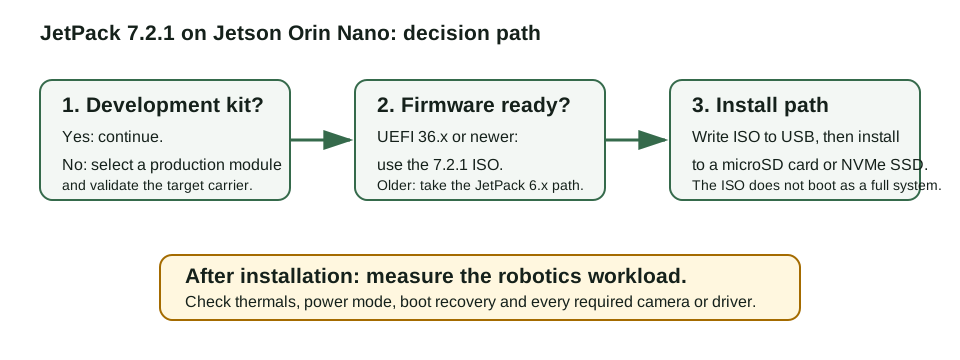
JetPack 7.2.1 uses Jetson ISO on the Orin Nano Developer Kit. NVIDIA says to write the ISO to a USB flash drive, boot it on the kit and install Jetson Linux to attached target storage. The target can be a microSD card or an NVMe SSD.[2]
That detail prevents a common error. The ISO USB is an installer, not a full live system. NVIDIA says it does not support booting into a complete Jetson BSP for a test drive. The same guide says that SD card images are no longer supported from JetPack 7.2 onward.[2]
Before starting, inspect the firmware path. The guide requires JetPack 6.x generation UEFI and QSPI firmware. A kit with a version older than 36.0 should take NVIDIA's JetPack 6.x update path before attempting the 7.2.1 ISO.[2]
Does the Super Mode default make the kit faster?
It can change the test configuration, but it is not a performance promise. NVIDIA says the 7.2.1 ISO flashes the Orin Nano Developer Kit with Super Mode configuration by default. Its quick start guide lists 25 W as the usual default power mode and identifies MAXN SUPER as the maximum performance option.[1][2]
The FAQ places the context around that claim. NVIDIA warns that Super Mode needs a higher power budget and can demand carrier board and thermal work. For Orin Nano, it directs users to the developer kit carrier and thermal design as the reference.[3]
Measure the exact mode that the robot will use. Record input power, temperature, sustained inference latency, dropped camera frames and restart behavior. A higher benchmark result is not useful if a fan limit, battery constraint or thermal throttle breaks the task.
Update the board only after the whole robot workload has a named pass condition. A booted desktop is not a robotics validation result.
What must a robotics team test after the update?
Start with repeatable recovery. Confirm that the updated kit boots from the intended storage, then test a restart and a clean power cycle. Keep the prior image and the new image identifiable so a failed test can return to a known state.
Next, run the actual sensor and compute path. For a camera robot, record the camera format, frame rate, timestamps, CPU use, GPU use and inference latency at the required power mode. Then run the ROS nodes, logging and failure handling together. Teams choosing a distribution can compare ROS 2 Lyrical and Jazzy before rebuilding their workspace. NVIDIA's release list identifies the components included in 7.2.1. It does not certify any application assembled from them.[1]
This is also a useful moment to check board choice. If the new workload outgrows the Orin Nano test target, a hardware change may beat another software tweak. Our Jetson Thor vs AGX Orin guide explains how to compare a larger developer kit by measured memory, power and latency needs. The legged robot safety standards guide can help frame system-level validation before a field trial.
The update is a good fit for a controlled prototype refresh. It is a poor fit for a robot that cannot tolerate a storage wipe, has no test plan or treats a reference kit as the finished product.
Frequently asked questions
Should I update a Jetson Orin Nano Developer Kit to JetPack 7.2.1?
Update when the project needs the current JetPack 7 release and the team can reflash the kit, preserve a rollback image and test the complete robotics workload afterward.
Can I write the JetPack 7.2.1 ISO directly to a microSD card?
No. NVIDIA says to write the ISO to a USB flash drive, then use it to install Jetson Linux onto a microSD card or NVMe SSD.[2]
Does Super Mode guarantee faster robot performance?
No. The default Super Mode configuration changes the test setup, but the robot still needs power, thermal and workload validation.[2][3]
Sources
- https://developer.nvidia.com/embedded/jetpack/downloads/archive-7.2.1
- https://docs.nvidia.com/jetson/orin-nano-devkit/user-guide/latest/quick_start.html
- https://developer.nvidia.com/embedded/faq
- https://developer.nvidia.com/embedded/lifecycle